Friday, September 16, 2016

¿Cómo puede Google Search Console ayudarte a hacer una versión AMP de tu sitio web?

Si has implementado recientemente Accelerated Mobile Pages (AMP) en tu sitio web, es un buen momento para comprobar, usando Search Console, cuáles de tus páginas AMP han sido encontradas e indexadas por Google.

AMP-searchConsole.jpg


Search Console es un servicio gratuito que te ayuda a supervisar y mantener la presencia de tu sitio web en la Búsqueda de Google, incluida cualquier página AMP. No necesitas registrarte en Search Console para que se incluyan tus páginas AMP en los resultados de la Búsqueda de Google, pero hacerlo puede serte de ayuda para saber cuáles de ellas cumplen los requisitos para mostrarse en los resultados.


Para empezar con Search Console, crea una cuenta gratuita o inicia sesión aquí y valida la propiedad de tus sitios web.


Cuando hayas configurado el sitio en Search Console, abre el informe de Accelerated Mobile Pages en Aspecto de la búsqueda > Accelerated Mobile Pages para consultar qué páginas AMP de tu sitio web ha encontrado e indexado Google, tal y como se muestra a continuación:


Screen Shot 2016-09-15 at 3.00.08 PM.png


En el informe se incluye una lista de problemas relacionados con AMP para las páginas AMP que no estén indexadas, para que las identifiques y tomes alguna medida.


Search Console también te permite supervisar el rendimiento de tus páginas AMP en la Búsqueda de Google en el informe Analítica de búsqueda. Con este informe, sabrás con qué consultas se muestran tus páginas AMP en los resultados de búsqueda, podrás comparar sus métricas en relación con tus otros resultados y consultar cómo cambia la visibilidad de tus páginas AMP a lo largo del tiempo.


Para ver las métricas de tu página AMP, como los clics o las impresiones, selecciona selecciona Tráfico de búsqueda > Análisis de búsqueda > Filtrar por AMP.


Nota: Si acabas de crear una cuenta de Search Console o de configurar tus páginas AMP y todavía no se han detectado, recuerda que Google rastrea las páginas periódicamente. Puedes esperar a que se vuelva a realizar el rastreo periódico programado, o bien solicitar uno.


¿Has usado Search Console para rastrear tus páginas AMP? Danos tu opinión en la sección de comentarios que encontrarás a continuación o en la página Google Webmasters de Google+. Y, como de costumbre, si necesitas ayuda o tienes cualquier pregunta, no dudes en publicarla en el foro de ayuda para webmasters.

Escrito por Tom Taylor, Community Manager de AMP. Publicado por Joan Ortiz, Equipo de Calidad de Búsqueda.


from El Blog para Webmasters http://ift.tt/2d04wPg
via IFTTT

La densidad de las palabras clave en una página es un factor importante que permite a los motores de búsqueda la medición de la misma a la hora de posicionarla en las SERP.

Habrás leído en ocasiones que un post debe tener como mínimo unas 500 palabras, y me he preguntado por qué, si los tweets contienen 140 caracteres y tambien se posicionan en Google.

Aunque son muchos los comentarios y opiniones al respeto y, visto desde mi perspectiva, la cuestion en sí tiene mucho que ver con la densidad de las palabras clave.

Sinceramente no sigo muy de cerca lo que hacen los otros (antes sí), pero me acuerdo que hace unos años eran frecuentes los posts donde la densidad de la palabra clave era desmesurada, sin embargo, y gracias al panda de Google, todas esas páginas han sido penalizadas.

[box type="shadow" align="alignleft" class="" width=""]Ejemplo densidad alta - El mejor modo de ganar dinero en Internet!. Si deseas ganar dinero en Internet haz clic aquí y,  descubrirás ahora cómo gano dinero en internet y otro miles que también ganan dinero en Internet. [/box]

Es un ejemplo, añadiendo a eso hay que mencionar que tanto el domínio de esa página como el título de la misma también mencionaban la palabra clave. NO WAY!!

[box type="shadow" align="aligncenter" class="" width=""]Google es lo suficientemente listo para conocer de qué va el tema en cuestión sin necesidad de repetir cuatrocientas veces tu Keyword. [/box]

Seguramente alguien comentó "escribe para tus lectores y no para Google", y tenía más razón que un santo. No te pases con las Keywords, escribe como si le hablaras a tu amigo en un café, porque todo el esfuerzo que prestas cuando redactas un post puede verse afectado negativamente por haberlo optimizado demasiado con tu palabra clave. 

El Panda de Google va a determinar que tu página está "overoptimized" basándose pricipalmente en la experiencia del usuario, que no sólo tiene que ver la velocidad de carga de tu Web, también del tiempo que el visitante está en ella, si interactua visitando otras páginas o sale de la misma (rebote), tener un texto sin sentido como vimos en el ejemplo anterior, entre otras.

En éste post de dejujo.com puedes aprender más acerca del SEO OnPage.

Dicho ésto vamos a ver qué necesitamos saber para obtener uan densidad de palabras clave óptima.

[box type="info" align="" class="" width=""]
[mwm-aal-display]
[/box]


Cómo Calcular la Densidad de la Palabra Clave

Antes de iniciar un post deberiamos conocer cuales son las Keywords con las que vamos a trabajar, sus sinónimos y empezar a escribir sin que nos preocupe cuantas veces debemos utilizarlas, tampoco de si escribimos un texto de más de 500 palabras o menos, relax, comunica... y al finalizar veremos que se puede hacer para que todo nos cuadre a la perfección.

Una vez hemos finalizado, no publiques la entrada , simplemente guardala en drafts o no la indexes pues es a aprtir de aquí que vamos a empezar a toquetear el contenido.

La Fórmula Secreta. 2% | 1% | 0,2%

Debido a los múltiples nichos de mercado y temáticas, no exíste una fórmula exacta que nos permita conocer qué densidad de Keywords deben contener en nuestras entradas, es muy complicado. Si quieres, puedes analizar y conocer la densidad de tus competidores. Simplemente haz una búsqueda en Google y pega la URL en Internet Marketing Ninja Tool. Puedes copiar lo que hacen ellos o esperar un poco y te cuento como lo hago yo. ;-)

[tie_full_img]seobook[/tie_full_img]

Google mide la densidad de las palabras clave en "tres partes".

  1. % de la palabra más utilizada en toda la página (TODO, widgets, meta etc)
    [box type="success" align="aligncenter" class="" width=""]Esta palabra debería ser la más nombrada en tu entrada con un 2%[/box]

    En tu texto habrá una palabra que sobresalga sobre todas las demás, y seguramente sea tu Keyword, si no lo es, deberíamos editar la entrada cambiando las "ganadoras" por sus sinónimos. Además su densidad debería ser de un 2%. Si estás creando tu entrada e intentas posicionar la palabra "Zapatillas Running Nike" una de éstas tres debería ser la "ganadora". Yo me decantaría por "Running"

  2. % de 2 palabras juntas más utilizadas.
    [box type="success" align="aligncenter" class="" width=""]Estas dos palabras consecutivas deberían ser las más nombradas en tu entrada con un 1%[/box]

    Lo mismo, las ganadoras aquí deberían ser "Zapatillas Running" con un 1%

  3. % de 3 palabras juntas más utilizadas.
    [box type="success" align="aligncenter" class="" width=""]Estas dos palabras consecutivas deberían ser las más nombradas en tu entrada con un 0,2%[/box]

    Aquí tienes que estrujarte el cerebro de verdad , pues deberás cambiar por sinónimos muchas palabras, lo que puede que también te cambie el % de los dos casos anteriores. Si hiciste el post demasiado corto , te será imposible conseguir el 0,2% y mucho menos que las tres métricas te coincidan, y yo me pregunto, ¿no será por este motivo que nuestras entradas deben contener un mínimo de 500 palabras? Puede que sí, o puede que sean cosas mías. Lo que está claro es que cuanto más escribas, mejor podrás optimizar tu Keyword Density.

Parece fácil  pero no o es. Aquí te dejo una imagen con el trabajo a realizar con el fin de conseguir una buena densidad de palabras clave.

El post es http://ift.tt/2cGLQ2f con 3131 palabras.

Palabra clave supuestamente a posicionar "que significa IFTTT"

[tie_full_img]densidad-palabra-clave[/tie_full_img]


Si haces click en la Imagen lo veras más claro, la tarea aquí consiste en que la palabra "IFTTT" consiga el 2%. Las palabras consecutivas "significa IFTTT" logren el 1% y la palabra clave por la que posicionar "que significa IFTTT" logre el 0,2. Además en la tercera columna tengo que conseguir bajar del 0,20 las dos primeras.

Hasta aquí éste post , espero te ayude en la composición de tus entradas y te sirva de guía para que puedas obtener una Keywor Density idónea.


fue visto primero en tomeucapella.com

How To Support Data with Real-Life Interviews - Whiteboard Friday

Posted by rcancino

With all the data that today's marketers can access, there's often still no substitute for the quality of information you can get from interviewing real people. In today's Whiteboard Friday, we welcome Rebekah Cancino -- a partner at Phoenix-based Onward and #MozCon 2016 speaker -- to teach us the whys and hows of great interviews.


Click on the whiteboard image above to open a high resolution version in a new tab!

Video Transcription

Hi, Moz fans. I'm Rebekah Cancino. I'm a partner at Onward, and I lead content strategy and user experience design. Today I'm here to talk to you about how to support the data you have, your keyword data, data around search intent, analytics with real life user interviews.

So recently, Rand has been talking a little more about the relationship between user experience design and SEO, whether it's managing the tensions between the two or the importance of understanding the path to customer purchase. He said that in order to understand that path, we have to talk to real people. We have to do interviews, whether that's talking to actual users or maybe just people inside your company that have an understanding of the psychographics and the demographics of your target audience, so people like sales folks or customer service reps.

Now, maybe you're a super data-driven marketer and you haven't felt the need to talk to real people and do interviews in the past, or maybe you have done user interviews and you found that you got a bunch of obvious insights and it was a huge waste of time and money.

I'm here to tell you that coupling your data with real interviews is always going to give you better results. But having interviews that are useful can be a little bit tricky. The interviews that you do are only as good as the questions you ask and the approach that you take. So I want to make sure that you're all set and prepared to have really good user interviews. All it takes is a little practice and preparation.

It's helpful to think of it like this. So the data is kind of telling us what happened. It can tell us about online behaviors, things like keywords, keyword volume, search intent. We can use tools, like KeywordTool.io or Ubersuggest or even Moz's Keyword Explorer, to start to understand that.

We can look at our analytics, entry and exit pages, bounces, pages that get a lot of views, all of that stuff really important and we can learn a lot from it. But with our interviews, what we're learning about is the why.
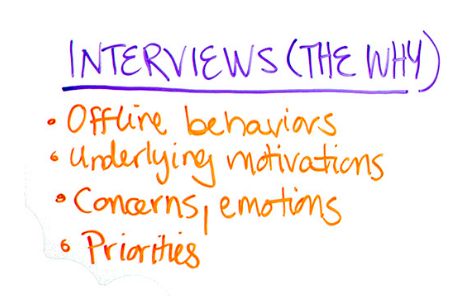
This is the stuff that online data just can't tell us. This is about those offline behaviors, the emotions, beliefs, attitudes that drive the behaviors and ultimately the purchase decisions. So these two things working together can help us get a really great picture of the whole story and make smarter decisions.

So say, for example, you have an online retailer. They sell mainly chocolate-dipped berries. They've done their homework. They've seen that most of the keywords people are using tend to be something like "chocolate dipped strawberries gifts" or "chocolate dipped strawberries delivered." And they've done the work to make sure that they've done their on-page optimization and doing a lot of other smart things too using that.

But then they also noticed that their Mother's Day packages and their graduation gifts are not doing so well. They're starting to see a lot of drop-offs around that product description page and a higher cart abandonment rate than usual.

Now, given the data they had, they might make decisions like, "Well, let's see if we can do a little more on-page keyword optimization to reflect what's special about the graduation and Mother's Day gifts, or maybe we can refine the user experience of the checkout process. But if they talk to some real users -- which they did, this is a real story -- they might learn that people who send food gift items, they worry about: Is the person I'm sending the gift to, are they going to be home when this gift arrives? Because this is a perishable item, like chocolate-dipped berries, will it melt?

Now, this company, they do a lot of work to protect the berries. The box that they arrive in is super insulated. It's like its own cooler. They have really great content that tells that story. The problem is that content is buried in the FAQs instead of on the pages in places it matters most -- the product detail, the checkout flow.

So you can see here how there's an opportunity to use the data and the interview insights together to make smarter decisions. You can get to insights like that for your organization too. Let's talk about some tips that are going to help you make smarter interview decisions.

So the first one is to talk to a spectrum of users who represent your ideal audience. Maybe, like with this berry example, their ideal customer tends to skew slightly female. You would want that group of people, that you're talking to, to skew that way too. Perhaps they have a little more disposable income. That should be reflected in the group of people that you're interviewing and so forth. You get it.

The next one is to ask day-in-the-life, open-ended questions. This is really important. If you ask typical marketing questions like, "How likely are you to do this or that?" or, "Tell me on a scale of 1 to 10 how great this was," you'll get typical marketing answers. What we want is real nuanced answers that tell us about someone's real experience.

So I'll ask questions like, "Tell me about the last time you bought a food gift online? What was that like?" We're trying to get that person to walk us through their journey from the minute they're considering something to how they vet the solutions to actually making that purchase decision.

Next is don't influence the answers. You don't want to bias someone's response by introducing an idea. So I wouldn't say something like, "Tell me about the last time you bought a food gift online. Were you worried that it would spoil?" Now I've set them on a path that maybe they wouldn't have gone on to begin with. It's much better to let that story unfold naturally.

Moving on, dig deeper. Uncover the why, really important. Maybe when you're talking to people you realize that they like to cook and by sharing a food item gift with someone who's far away, they can feel closer to them. Maybe they like gifts to reflect how thoughtful they are or what good tastes they have. You always want to uncover the underlying motives behind the actions people are taking.

So don't be too rushed in skipping to the next question. If you hear something that's a little bit vague or maybe you see a point that's interesting, follow up with some probes. Ask things like, "Tell me more about that," or, "Why is that? What did you like about it?" and so on.

Next, listen more than you talk. You have maybe 30 to 45 minutes max with each one of these interviews. You don't want to waste time by inserting yourself into their story. If that happens, it's cool, totally natural. Just find a way to back yourself out of that and bring the focus back to the person you're interviewing as quickly and naturally as possible.

Take note of phrases and words that they use. Do they say things like "dipped berries" instead of "chocolate-dipped strawberries?" You want to pay attention to the different ways and phrases that they use. Are there regional differences? What kinds of words do they use to describe your product or service or experience? Are the berries fun, decadent, luxurious? By learning what kind of language and vocabulary people use, you can have copy, meta descriptions, emails that take that into account and reflect that.

Find the friction. So in every experience that we have, there's always something that's kind of challenging. We want to get to the bottom of that with our users so we can find ways to mitigate that point of friction earlier on in the journey. So I might ask someone a question like, "What's the most challenging thing about the last time you bought a food gift?"

If that doesn't kind of spark an idea with them, I might say something even a little more broad, like, "Tell me about a time you were really disappointed in a gift that you bought or a food gift that you bought," and see where that takes them.

Be prepared. Great interviews don't happen by accident. Coming up with all these questions takes time and preparation. You want to put a lot of thought into them. By asking questions that tell me about the nature of the whole journey, you want to be clear about your priorities. Know which questions are most important to you and know which ones are must have pieces of information. That way you can use your time wisely while you still let the conversation flow where it takes you.

Finally, relax and breathe. The people you're interviewing are only going to be as relaxed as you are. If you're stiff or overly formal or treating this like it's a chore and you're bored, they're going to pick up on that energy and they're probably not going to feel comfortable sharing their thoughts with you, or there won't be space for that to happen.

Make sure you let them know ahead of time, like, "Hey, feel free to be honest. These answers aren't going to be shared in a way that can be attributed directly to you, just an aggregate."

And have fun with it. Be genuinely curious and excited about what you're going to learn. They'll appreciate that too.

So once you've kind of finished and you've wrapped up those interviews, take a step back. Don't get too focused or caught up on just one of the results. You want to kind of look at the data in aggregate, the qualitative data and let it talk to you.

What stories are there? Are you seeing any patterns or themes that you can take note of, kind of like the theme around people being worried about the berries melting? Then you can organize those findings and make sure you summarize it and synthesize it in a way that the people who have to use those insights that you've gotten can make sense of.

Make sure that you tell real stories and humanize this information. Maybe you recorded the interviews, which is always a really good idea. You can go back and pull out little sound bites or clips of the people saying these really impactful things and use that when you're presenting the data.

So going back to that berry example, if you recall, we had that data around: Hey, we're seeing a lot of drop-offs on the product description page. We're seeing a higher cart abandonment rate. But maybe during the user interviews, we noticed a theme of people talking about how they obsessively click the tracking link on the packages, or they wait for those gift recipients to send them a text message to say, "Hey, I got this present." As you kind of unraveled why, you noticed that it had to do with the fact that these berries might melt and they're worried about that.

Well, now you can elevate the content that you have around how those berries are protected in a little cooler-like box on the pages and the places it matters most. So maybe there's a video or an animated GIF that shows people how the berries are protected, right there in the checkout flow.

I hope that this encourages you to get out there and talk to real users, find out about their context and use that information to really elevate your search data. It's not about having a big sample size or a huge survey. It's much more about getting to real life experiences around your product or service that adds depth to the data that you have. In doing that, hopefully you'll be able to increase some conversions and maybe even improve behavioral metrics, so those UX metrics that, I don't know, theoretically could lead to higher organic visibility anyway.

That's all for now. Thanks so much. Take care.

Video transcription by Speechpad.com


Sign up for The Moz Top 10, a semimonthly mailer updating you on the top ten hottest pieces of SEO news, tips, and rad links uncovered by the Moz team. Think of it as your exclusive digest of stuff you don't have time to hunt down but want to read!


from Moz Blog http://ift.tt/2cNPR9r
via IFTTT

Thursday, September 15, 2016

Cómo empezar a usar Accelerated Mobile Pages

¿Quieres empezar a usar Accelerated Mobile Pages, pero no sabes cómo? Hacer una versión AMP de tu sitio web para que funcione a la velocidad de la luz es más fácil de lo que crees.


AMP-3.jpg


Si usas un sistema de gestión de contenido (CMS) como WordPress, Drupal o Hatena, para preparar una versión AMP tan solo tienes que instalar y activar un complemento. Cada CMS tiene un método ligeramente distinto de hacer una versión AMP de una página, así que vale la pena ponerse en contacto con tu proveedor para consultarle cómo empezar.


Por otro lado, si tu sitio web usa HTML personalizado o quieres conocer todos los detalles sobre cómo funciona AMP, consulta el laboratorio de programación de AMP para sumergirte en una experiencia guiada y práctica de codificación diseñada para ayudarte durante el proceso de desarrollo de tus primeras páginas. En el laboratorio de programación se tratan todos los elementos básicos:


       Cómo mejorar la experiencia de usuario de las webs para móviles con AMP

       Fundamentos de una página AMP

       Limitaciones de AMP

       Cómo resolver problemas habituales con los componentes web de AMP

       Cómo validar las páginas AMP

       Cómo preparar tus páginas AMP para la búsqueda de Google


¿Ya conoces bien los conceptos básicos? Quizá te gustaría seguir aprendiendo con el laboratorio de programación de conceptos avanzados.


¿Has probado los laboratorios de programación o has añadido algún complemento de AMP a tu sitio web? Comparte tu opinión en la sección de comentarios que encontrarás a continuación o en la página Google Webmasters de Google+.Y, como de costumbre, si necesitas ayuda o tienes cualquier pregunta, no dudes en publicarla en el foro de ayuda para webmasters.

Escrito por Tom Taylor, Community Manager de AMP. Publicado por Joan Ortiz, Equipo de Calidad de Búsqueda.


from El Blog para Webmasters http://ift.tt/2cpxIK9
via IFTTT

¿Qué son las páginas AMP?


Hoy en día los usuarios esperan que los sitios web para móviles se carguen muy rápido. La realidad es que, a menudo, tardan unos segundos. No es de extrañar que el 40% de las personas abandonen los sitios web que necesiten más de tres segundos en cargarse. Para reducir el tiempo que tarda el contenido en llegar al dispositivo móvil del usuario, hemos empezado a trabajar en el proyecto Accelerated Mobile Pages (AMP), una iniciativa de software libre para mejorar la experiencia web en móviles para todo el mundo.

Las Accelerated Mobile Pages son páginas HTML que aprovechan varias soluciones técnicas para priorizar la velocidad y ofrecer una experiencia más rápida para los usuarios cargando el contenido casi al instante.

A finales de año, todos los sitios web que creen páginas AMP tendrán mayor visibilidad en toda la página de resultados de Búsqueda para móviles de Google, como sitios de comercio electrónico, entretenimiento, viajes, recetas y mucho más. Visita la página “Who” ("Quién" en inglés) de AMPProject.org para hacerte una idea de los sitios web que ya crean contenido AMP y prueba la demo en g.co/ampdemo para ver versiones AMP de páginas etiquetadas con el siguiente logo:
The AMP Logo


Durante las próximas semanas, antes de la implementación de AMP en la Búsqueda de Google, publicaremos consejos para ayudarte a hacer una versión AMP de tu sitio web, lo que se conoce como #AMPlify. Síguenos con el hashtag #AMPlify en G+ y Twitter.

¿Ya has diseñado páginas AMP para tu sitio web? Comparte tu opinión en la sección de comentarios que encontrarás a continuación o en la página Google Webmasters de Google+. Y, como de costumbre, si necesitas ayuda o tienes cualquier pregunta, no dudes en publicarla en el foro de ayuda para webmasters.

Escrito por Tomo Taylor, Community Manager de AMP. Publicado por Joan Ortiz, Equipo de Calidad de Búsqueda.


from El Blog para Webmasters http://ift.tt/2d2kd7f
via IFTTT

Introducing Progressive Web Apps: What They Might Mean for Your Website and SEO

Posted by petewailes

Progressive Web Apps. Ah yes, those things that Google would have you believe are a combination of Ghandi and Dumbledore, come to save the world from the terror that is the Painfully Slow WebsiteTM.

But what actually makes a PWA? Should you have one? And if you create one, how will you make sure it ranks? Well, read on to find out...

What's a PWA?

Given as that Google came up with the term, I thought we'd kick off with their definition:

"A Progressive Web App uses modern web capabilities to deliver an app-like user experience."
Progressive Web Apps

The really exciting thing about PWAs: they could make app development less necessary. Your mobile website becomes your app. Speaking to some of my colleagues at Builtvisible, this seemed to be a point of interesting discussion: do brands need an app and a website, or a PWA?

Fleshing this out a little, this means we'd expect things like push notifications, background sync, the site/app working offline, having a certain look/design to feel like a native application, and being able to be set on the device home screen.

These are things we traditionally haven't had available to us on the web. But thanks to new browsers supporting more and more of the HTML5 spec and advances in JavaScript, we can start to create some of this functionality. On the whole, Progressive Web Apps are:

Progressive
Work for every user, regardless of browser choice because they're built with progressive enhancement as a core tenet.
Responsive
Fit any form factor: desktop, mobile, tablet, or whatever is next.
Connectivity independent
Enhanced with service workers to work offline or on low quality networks.
App-like
Feel like an app to the user with app-style interactions and navigation because they're built on the app shell model.
Fresh
Always up-to-date thanks to the service worker update process.
Safe
Served via HTTPS to prevent snooping and ensure content hasn't been tampered with.
Discoverable
Are identifiable as "applications" thanks to W3C manifests and service worker registration scope allowing search engines to find them.
Re-engageable
Make re-engagement easy through features like push notifications.
Installable
Allow users to "keep" apps they find most useful on their home screen without the hassle of an app store.
Linkable
Easily share via URL and not require complex installation.
Source: Your First Progressive Web App (Google)

It's worth taking a moment to unpack the "app-like" part of that. Fundamentally, there are two parts to a PWA: service workers (which we'll come to in a minute), and application shell architecture. Google defines this as:

...the minimal HTML, CSS, and JavaScript powering a user interface. The application shell should:
  • load fast
  • be cached
  • dynamically display content
An application shell is the secret to reliably good performance. Think of your app's shell like the bundle of code you'd publish to an app store if you were building a native app. It's the load needed to get off the ground, but might not be the whole story. It keeps your UI local and pulls in content dynamically through an API.
Instant Loading Web Apps with an Application Shell Architecture

This method of loading content allows for incredibly fast perceived speed. We are able to get something that looks like our site in front of a user almost instantly, just without any content. The page will then go and fetch the content and all's well. Obviously, if we actually did things this way in the real world, we'd run in to SEO issues pretty quickly, but we'll address that later too.

If then, at their core, a Progressive Web App is just a website served in a clever way with extra features for loading stuff, why would we want one?

The use case

Let me be clear before I get into this: for most people, a PWA is something you don't need. That's important enough that it bares repeating, so I'll repeat it:

You probably don't need a PWA.

The reason for this is that most websites don't need to be able to behave like an app. This isn't to say that there's no benefit to having the things that PWA functionality can bring, but for many sites, the benefits don't outweigh the time it takes to implement the functionality at the moment.

When should you look at a PWA then? Well, let's look at a checklist of things that may indicate that you do need one...

Signs a PWA may be appropriate

You have:

  • Content that regularly updates, such as stock tickers, rapidly changing prices or inventory levels, or other real-time data
  • A chat or comms platform, requiring real-time updates and push notifications for new items coming in
  • An audience likely to pull data and then browse it offline, such as a news app or a blog publishing many articles a day
  • A site with regularly updated content which users may check in to several times a day
  • Users who are mostly using a supported browser

In short, you have something beyond a normal website, with interactive or time-sensitive components, or rapidly released or updated content. A good example is the Google Weather PWA:

If you're running a normal site, with a blog that maybe updates every day or two, or even less frequently, then whilst it might be nice to have a site that acts as a PWA, there's probably more useful things you can be doing with your time for your business.

How they work

So, you have something that would benefit from this sort of functionality, but need to know how these things work. Welcome to the wonder that is the service worker.

Service workers can be thought of as a proxy that sits between your website and the browser. It calls for intercept of things you ask the browser to do, and hijacking of the responses given back. That means we can do things like, for example, hold a copy of data requested, so when it's asked for again, we can serve it straight back (this is called caching). This means we can fetch data once, then replay it a thousand times without having to fetch it again. Think of it like a musician recording an album — it means they don't have to play a concert every time you want to listen to their music. Same thing, but with network data.

If you want a more thorough explanation of service workers, check out this moderately technical talk given by Jake Archibald from Google.

What service workers can do

Service workers fundamentally exist to deliver extra features, which have not been available to browsers until now. These includes things like:

  • Push notifications, for telling a user that something has happened, such as receiving a new message, or that the page they're viewing has been updated
  • Background sync, for updating data while a user isn't using the page/site
  • Offline caching, to allow a for an experience where a user still may be able to access some functionality of a site while offline
  • Handling geolocation or other device hardware-querying data (such as device gyrpscope data)
  • Pre-fetching data a user will soon require, such as images further down a page

It's planned that in the future, they'll be able to do even more than they currently can. For now though, these are the sorts of features you'll be able to make use of. Obviously these mostly load data via AJAX, once the app is already loaded.

What are the SEO implications?

So you're sold on Progressive Web Apps. But if you create one, how will you make sure it ranks? As with any new front-end technology, there are always implications for your SEO visibility. But don't panic; the potential issues you'll encounter with a PWA have been solved before by SEOs who have worked on JavaScript-heavy websites. For a primer on that, take a look at this article on JS SEO.

There are a few issues you may encounter if you're going to have a site that makes use of application shell architecture. Firstly, it's pretty much required that you're going to be using some form of JS framework or view library, like Angular or React. If this is the case, you're going to want to take a look at some Angular.JS or React SEO advice. If you're using something else, the short version is you'll need to be pre-rendering pages on the server, then picking up with your application when it's loaded. This enables you to have all the good things these tools give you, whilst also serving something Google et al can understand. Despite their recent advice that they're getting good at rendering this sort of application, we still see plenty of examples in the wild of them flailing horribly when they crawl heavy JS stuff.

Assuming you're in the world of clever JS front-end technologies, to make sure you do things the PWA way, you'll also need to be delivering the CSS and JS required to make the page work along with the HTML. Not just including script tags with the <code>src attribute, but the whole file, inline.

Obviously, this means you're going to increase the size of the page you're sending down the wire, but it has the upside of meaning that the page will load instantly. More than that, though, with all the JS (required for pick-up) and CSS (required to make sense of the design) delivered immediately, the browser will be able to render your content and deliver something that looks correct and works straightaway.

Again, as we're going to be using service workers to cache content once it's arrived, this shouldn't have too much of an impact. We can also cache all the CSS and JS external files required separately, and load them from the cache store rather than fetching them every time. This does make it very slightly more likely that the PWA will fail on the first time that a user tries to request your site, but you can still handle this case gracefully with an error message or default content, and re-try on the next page view.

There are other potential issues people can run in to, as well. The Washington Post, for example, built a PWA version of their site, but it only works on a mobile device. Obviously, that means the site can be crawled nicely by Google's mobile bots, but not the desktop ones. It's important to respect the P part of the acronym — the website should enable features that a user can make use of, but still work in a normal manner for those who are using browsers that don't support them. It's about enhancing functionality progressively, not demanding that people upgrade their browser.

The only slightly tricky thing with all of this is that it requires that, for best experience, you design your application for offline-first experiences. How that's done is referenced in Jake's talk above. The only issue with going down that route: you're only serving content once someone's arrived at your site and waited long enough to load everything. Obviously, in the case of Google, that's not going to work well. So here's what I'd suggest...

Rather than just sending your application shell, and then using AJAX to request content on load, and then picking up, use this workflow instead:

  • User arrives at site
  • Site sends back the application shell (the minimum HTML, JS, and CSS to make everything work immediately), along with...
  • ...the content AJAX response, pre-loaded as state for the application
  • The application loads that immediately, and then picks up the front end.

Adding in the data required means that, on load, we don't have to make an AJAX call to get the initial data required. Instead, we can bundle that in too, so we get something that can render content instantly as well.

As an example of this, let's think of a weather app. Now, the basic model would be that we send the user all the content to show a basic version of our app, but not the data to say what the weather is. In this modified version, we also send along what today's weather is, but for any subsequent data request, we then go to the server with an AJAX call.

This means we still deliver content that Google et al can index, without possible issues from our AJAX calls failing. From Google and the user's perspective, we're just delivering a very high-performance initial load, then registering service workers to give faster experiences for every subsequent page and possibly extra functionality. In the case of a weather app, that might mean pre-fetching tomorrow's weather each day at midnight, or notifying the user if it's going to rain, for example.

Going further

If you're interested in learning more about PWAs, I highly recommend reading this guide to PWAs by Addy Osmani (a Google Chrome engineer), and then putting together a very basic working example, like the train one Jake mentions in his YouTube talk referenced earlier. If you're interested in that, I recommend Jake's Udacity course on creating a PWA available here.


Sign up for The Moz Top 10, a semimonthly mailer updating you on the top ten hottest pieces of SEO news, tips, and rad links uncovered by the Moz team. Think of it as your exclusive digest of stuff you don't have time to hunt down but want to read!


from Moz Blog http://ift.tt/2cWZUcJ
via IFTTT

Wednesday, September 14, 2016

Here’s How to Generate and Insert Rel Canonical with Google Tag Manager

Posted by luciamarin

In this article, we’re going to learn how to create the rel canonical URL tag using Google Tag Manager, and how to insert it in every page of our website so that the correct canonical is automatically generated in each URL.

We’ll do it using Google Tag Manager and its variables.

Why send a canonical from each page to itself?

Javier Lorente gave us a very good explanation/reminder at the 2015 SEO Salad event in Zaragoza (Spain). In short, there may be various factors that cause Google to index unexpected variants of a URL, and this is often beyond our control:

  • External pages that display our website but use another URL (e.g., Google’s own cache, other search engines and content aggregators, archive.org, etc.). This way, Google will know which one is the original page at all times.
  • Parameters that are irrelevant to SEO/content such as certain filters and order sequences

By including this “standard” canonical in every URL, we are making it easy for Google to identify the original content.

How do we generate the dynamic value of the canonical URL?

To generate the canonical URL, dynamically we need to force it to always correspond to the “clean" (i.e., absolute, unique, and simplified) URL of each page (taking into account the www, URL query string parameters, anchors, etc.).

Remember that, in summary, the URL variables that can be created in GTM (Google Tag Manager) correspond to the following components:

URL variables in Google Tag Manager

We want to create a unique URL for each page, without queries or anchors. We need a “clean” URL variable, and we can’t use the built-in variable, for two reasons:

  1. Although fragment doesn’t form part of the URL by default, query string params does
  2. Potential problems with protocol and hostname, if different options are admitted (e.g., SSL and www)

Therefore, we need to combine Protocol + Host + Path into a single variable.

Now, let's take a step-by-step look at how to create our variable.

1. Create to compile the section of the URL according to whether it’s an http:// or https://

page protocol

Note: We’re assuming that the entire website will always function under a single protocol. If that’s not the case, then we should substitute the variable for plain text in the final variable of Step #4. (This will allow us to force it to always be http/https, without exception.)

2. Create

We need a variable in which the hostname is always unique, whether or not it’s entered into the browser with the www. The hostname canonical must always be the same, regardless of whether or not it has the www. We can decide based on which one of the domains is redirected to the other, and then keep the original as the canonical.

How do we create the canonical domain?

  • Option 2.1: Redirect the domain with www. to a domain without www. via 301
    Our canonical URL is WITHOUT www. We need to create Page Hostname, but make sure we always remove the www:
    Page hostname canonical without www
  • Option 2.2: Redirect the domain without www. to a domain with www. via 301
    Our canonical URL is WITH www. We need to create Page Hostname without www (like before), and then insert the www in front using a constant variable:
    Page hostname canonical with www

3. Enable the built-in variable

Enabled Built-in variables

Note: Although we have the built-in variable, for this exercise it’s preferable not to use it, as we’re not 100% sure how it will behave in relation to the www (e.g., in this instance, it’s not configurable, unlike when we create it as a GTM custom variable).

4. Create

Link the three previous variables to form a constant variable:

://

Summary/Important notes:

  1. Protocol: returns http / https (without ://), which is why we enter this part by hand
  2. Hostname: we can force removal of the www. or not
  3. Path: included from the slash /. Does not include the query, so it's perfect. We use the built-in option for Page Path.

Page URL canonical

Now that we have created , we could even populate it into Google Analytics via custom dimensions. You can learn to do that in this Google Analytics custom dimensions guide.

How can we insert the canonical into a page using Tag Manager?

Let’s suppose we’ve already got a canonical URL generated dynamically via GTM: .

Now, we need to look at how to insert it into the page using a GTM tag. We should emphasize that this is NOT the “ideal” solution, as it’s always preferable to insert the tag into the <head> of the source code. But, we have confirming evidence from various sources that it DOES work if it’s inserted via GTM. And, as we all know, in most companies, the ideal doesn’t always coincide with the possible!

If we could insert content directly into the <head> via GTM, it would be sufficient to use the following custom HTML tag:

<link href=”” />

But, we know that this won’t work because the inserted content in HTML tags usually goes at the end of the </body>, meaning Google won’t accept or read a <link rel="canonical"> tag there.

So then, how do we do it? We can use JavaScript code to generate the tag and insert it into the <head>, as described in this article, but in a form that has been adapted for the canonical tag:

<script>
 var c = document.createElement('link'); 
 c.; 
 c.href = ; 
 document.head.appendChild(c);
</script>

And then, we can set it to fire on the “All Pages” trigger. Seems almost too easy, doesn’t it?

REL Canonical

How do we check whether our rel canonical is working?

Very simple: Check whether the code is generated correctly on the page.

How do we do that?

By looking at the DevTools Console in Chrome, or by using a browser plugin like like Firebug that returns the code generated on the page in the DOM (document object model). We won't find it in the source code (Ctrl+U).

Here’s how to do this step-by-step:

  1. Open Chrome
  2. Press F12
  3. Click on the first tab in the console (Elements)
    elements tab
  4. Press Ctrl+F and search for “canonical”
  5. If the URL appears in the correct form at the end of the <head>, that means the tag has been generated correctly via Tag Manager
    tag generated correctly

That's it. Easy-peasy, right?

So, what are your thoughts?

Do you also use Google Tag Manager to improve your SEO? Why don’t you give us some examples of when it’s been useful (or not)?


Sign up for The Moz Top 10, a semimonthly mailer updating you on the top ten hottest pieces of SEO news, tips, and rad links uncovered by the Moz team. Think of it as your exclusive digest of stuff you don't have time to hunt down but want to read!


from Moz Blog http://ift.tt/2cMqAbC
via IFTTT