Wednesday, December 23, 2015

In-SERP Conversions: Dawn of the 100% Conversion Rate?

Posted by Alan_Coleman

By now, we're all pretty used to Knowledge Graph results in the SERPs. But what could it mean when Google offers the ability to make a purchase, a call, book an appointment, or otherwise convert customers within those results? In this video blog, Alan Coleman speculates about a potential 100% conversion rate in the SERPs and raises the question of Google's role in an increasingly app-centric world.

Video transcript

In this video blog, I’m going to talk to you about a key trend we’ve noticed with Google here at Wolfgang.

12 months ago, the key trend that we were talking about was Google had shifted its focus. From Google’s birth right up until last year, its objective was to get you to the website that was most relevant, most authoritative, most likely to answer your question — whereas what we saw 12 months ago was Google taking a lot more ownership of your journey from question to answer. And what we were seeing 12 months ago was a lot more questions literally being answered on the SERPs, pulling information from Wikipedia, from other websites and giving that to the user directly on Google.

A very recent update to this innovation is that Google is now actually using their own search data to give you further details. Last weekend I was searching for a restaurant and not only did it give me the reviews in the knowledge panel — the website, phone number, and opening hours — it also used its own data to give me the popular times: when I was most likely to get seated in the restaurant, and when it could be a problem.

So, armed with that information, we could go and have a lovely Italian lunch last weekend. But it doesn’t just stop at answering the question.

Conversions facilitated on the SERPs

Google’s methodology has always been to test things out in the organic list first and then, when they’ve learned the mechanics of it, they might try and commercialize it. What we’re beginning to see is not just questions being answered on the SERPs, but we’re beginning to see conversions being facilitated by the SERPs.

What you’re seeing here is someone searching for a medical practitioner. The searcher is actually able to book an appointment directly from the search engine results page.

Another recent innovation: call-only campaigns. Somebody's searching for a courier, for example, and again, they can call the courier directly from the search engine results without even visiting the website. We’ve also seen click-to-call campaigns, another example of Google users being able to convert directly from the SERP. Very exciting! In theory, we’re talking about 100% conversion rates here: everyone who clicks on your ad becomes a lead or becomes a sale.

There’s also this beta which is currently out — with a very limited number of retailers in the States — whereby searchers are taken from search, to checkout, to placing their order in 3 clicks, all happening on a Google property.

googlepurchase.gif

Image courtesy of Google

Why I believe this is significant:

This is Google safeguarding its position as we move to an app ecosystem. World Wide Web usage is actually in decline of late, because people are moving so much of their web behavior to apps, and Google’s strength has been that it’s our gateway to the Web. Google went down for a period of 4 minutes two years ago, and World Wide Web traffic fell off a cliff — it declined by 40% for that period.

Google is our gateway to the Web. However, if we start moving our Internet usage to apps, Google needs to be relevant there as well. I see that answering questions within Google and on Google, allowing people to convert, again in Google and on Google, is a move for them to safeguard their position as the place where we get our questions answered and where we do our transactions on the Web.

***

Do you have any thoughts on in-SERP conversions? Join the discussion in the comments below!


Sign up for The Moz Top 10, a semimonthly mailer updating you on the top ten hottest pieces of SEO news, tips, and rad links uncovered by the Moz team. Think of it as your exclusive digest of stuff you don't have time to hunt down but want to read!


from Moz Blog http://ift.tt/1NL7z46
via IFTTT

Tuesday, December 22, 2015

Brands That Won (and Lost) Google in 2015

Posted by Dr-Pete

As part of the MozCast 10K (a 10,000-keyword daily Google tracker), we keep a close eye on the domains with the most page-one Google real-estate. As of December 1st, these were the "Big 10":

"Share" represents the percentage of total results each domain has across the entire data set. Of course, absolute rankings can vary a lot depending on the data set, but what's more interesting is how any given brand moves over time.

We watch day-to-day movements closely as search marketers, and often track winners and losers when Google announces a big update, but I thought it would be interesting to take the long-term view. Who are the brands who won and lost the most Google real estate in the past year? All of the data from this post is from the MozCast 10K and spans December 1, 2014–December 1, 2015.

Biggest winners in 2015

If we look at absolute gains in total page-one Google real estate, the winners are in the table below. The "Rank" columns shows their current position in the Top 100:

Online retail giant Amazon.com held tight to the #2 position in our data set, making the biggest overall gain. Etsy made impressive gains, jumping from the #81 spot at the end of 2014 to the #31 spot on December 1st, 2015. Even with its financial woes, Groupon performed solidly on Google, moving from the #87 spot to #40. Instagram jumped from outside of the Top 100 entirely (#141) to #57.

It's interesting to note that two of the biggest gains in 2015 were for Google properties, YouTube and Google Play. YouTube moved from #5 to #4, and Google Play came in just shy of the Top 10 at #12. YouTube gains don't count growth in Video Cards, large video links which dominate some Google results. Here's an example Video Card from a search for "chandelier":

The numbers in the chart above may seem small, but keep in mind that there's only a 0.01% difference in total Google real-estate between #9 and #10 in the overall "Big 10." A tenth-of-a-percent represents massive land holdings in the world of page-one results.

Most improved in 2015

Another way to slice-and-dice winners in 2015 is to look at sites with the biggest relative gains. In other words, who improved the most relative to their position in 2014? Here are the Top 10 Most Improved:

Six of these are repeats from the overall winners list, but looking at relative changes, Etsy's and Instagram's gains are even more impressive. Both sites more than doubled their page-one Google real estate in our data set, with Etsy seeing gains of over 150%.

Biggest losers in 2015

Google real estate is limited, and for every winner there ultimately has to be one or more losers. These are the sites that took the heaviest absolute losses in our data set:

Social media giant Twitter was the big loser in 2015, falling out of the Top 10, from #6 in 2014 to #15 at the end of 2015. This "loss" may be deceptive, however, as Google and Twitter struck a deal in August of this year to display Tweets directly in search results. Here's an example, from a branded search for "Etsy":

Tweets are now a true Google vertical result, occupying an organic position and appearing in almost 6% of the searches that we track. Fellow social media site, Pinterest, also lost ground in 2015, after nearly breaking into the Top 10 (they were #11 in 2014). Unfortunately for Pinterest, their losses weren't offset by a sweetheart deal with Google.

Google-dominating Wikipedia showed a weak spot in their armor this year, losing twice the ground that #2 Amazon gained. Wikipedia took some losses early in 2015, and then ran into more trouble with their mid-year switch to a secure (https:) site.

Online auction site and aspiring retailer eBay added to their troubles in 2015, dropping out of the Top 10 from #9 to #17. eBay took heavy losses in May of 2014, but then partially recovered going into the beginning of 2015. As of December 1st, all of those short-term gains have disappeared in our data set.

Yelp gave up its #4 position in 2015 to YouTube, and seemed to suffer from some of Google's local changes this year. Retailers Walmart and Overstock also saw year-over-year losses, as did online answer site wikiHow.

An oddly dominant site in 2014, the NIH's National Library of Medicine site dropped from #17 to #20. Their presence may be the result of a high number of medical queries in our data set, and was probably impacted by a handful of niche Google updates, including the launch of the Medical Knowledge Panel, such as this one for "type 2 diabetes":

On the bright side, it looks like the Tax Man took a hit in 2015, with the IRS dropping from #19 to #27. While it seems odd that two government (.gov) sites hit our list of losers, I suspect this was coincidental.

The envelope, please...

While Amazon's continued dominance is impressive, and Wikipedia's tumble from grace is certainly worth noting, I think the big story this year is Etsy. In addition to taking the #2 spot in total gains, they more than doubled their 2014 Google page-one real estate and rocketed from the #81 overall position in our data set to #31. Etsy and other niche online retailers will be the ones to watch in 2016.


Sign up for The Moz Top 10, a semimonthly mailer updating you on the top ten hottest pieces of SEO news, tips, and rad links uncovered by the Moz team. Think of it as your exclusive digest of stuff you don't have time to hunt down but want to read!


from Moz Blog http://ift.tt/1YxWTea
via IFTTT

Monday, December 21, 2015

Get Ready for the Evolution of Long Tail Keywords, Coming Soon to Mobile Apps

Posted by Royh

Last month Google made a big announcement, potentially signaling a game changer for search. Google is quietly rolling out app-only content indexing, even if that content isn’t actually hosted on the indexed app.

So, what does that actually mean?

The game-changing implication is that when you search Google from your phone or tablet, app-only content will “stream” directly to your mobile device — even if you don’t have the app installed.

Thus, if I search for the key phrase “hotel tonight in Chicago,” I’ll see results from mobile apps that aren’t installed on my device, sending me directly to app-only content “streamed” from a virtual app hosted on the Google cloud.

Hotel Tonight

(Image credit: TechCrunch)

How is app content indexed differently?

Before this announcement, direct deep links to app content were displayed only if the matching app was already installed on your mobile device, as in the example below:

(Image credit: Google)

With this change, web content no longer needs to match app content.

According to Google’s Rajan Patel leading the new initiative:

“We want users to be able to have access to this content, regardless of whether it’s available on the web or in an app.”

How will this announcement change the way applications are discovered?

Well, Google is effectively lowering the bar for app indexing, and app owners can score a quick win if they act in a timely manner — a few tips on this below.

The new long tail landing page for mobile

The new app content streams are essentially equivalent to landing pages for a desktop website. Both share the same principal: promoting select content from the website or app.

That means focusing on long tail keywords. Simply changing the title and description of the home page of the app is no longer enough — targeting those long tail keywords is going to be essential.

To find the keywords that send traffic to competitors, I’ll use the SimilarWeb app analysis feature as an example. In this case, you can see how the search engine keywords that sent traffic to Snapchat's competitors — keywords searched in the Google app — drove traffic to Snapchat after the search, and were basically all keywords from app indexing.

What’s the key here?

Say hello to the app indexing API!

In order to make this whole process possible, app developers need to implement the app indexing API. It’s not new, but now that you don’t need to match app content to web content, it can be your secret weapon to torrents of mobile traffic.

The indexing API doubles as a ranking signal to Google, so all the mobile apps that implement and complete the app indexing API will gain a ranking edge.

Measure mobile engagement stats

Once you implement the indexing API, you'll show Google how much time users spend inside your app, and what they do there.

If you need a benchmark to go by, you can measure how your competitors' apps are doing in terms of time on the app and session per user. Here’s an example from SimilarWeb's app engagement function:

Again, the first thing you need to do in order to get started is implement the app indexing API, as I said earlier — since Google factors it as one of the ranking signals, it will favor the app owners that complete the process.

If you want some more instruction and technical walkthroughs for getting your app indexed, you can check out this piece by Bridget Randolph on the subject. Just keep in mind that this is still in beta.

Google is testing the process on a few apps that agreed to participate in this experiment. It’s still unclear when the update will be released out of beta, but I’m sure several clear winners (and losers) will emerge when this fully rolls out.

Sign up for The Moz Top 10, a semimonthly mailer updating you on the top ten hottest pieces of SEO news, tips, and rad links uncovered by the Moz team. Think of it as your exclusive digest of stuff you don't have time to hunt down but want to read!


from Moz Blog http://ift.tt/1IjjvgB
via IFTTT

Friday, December 18, 2015

What You Need to Know About Accelerated Mobile Pages (AMPs) - Whiteboard Friday

Posted by willcritchlow

You may have heard the term "AMPs" thrown around lately. What exactly are Accelerated Mobile Pages, what do they mean for search, and how can you prepare for it all? In this week's British Whiteboard Friday, Will Critchlow and Tom Anthony of Distilled lay out all the important details.
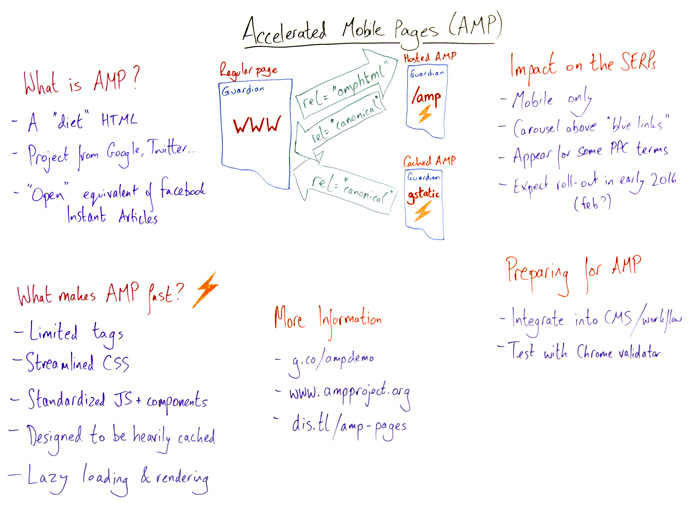
Accelerated Mobile Pages Whiteboard

Click on the whiteboard image above to open a high resolution version in a new tab!

Video Transcription

Tom: Howdy, Moz fans, and welcome to British Whiteboard Friday. We're filming this in the London HQ of Distilled. This is the founder and CEO, Will Critchlow. I'm Tom Anthony, head of the R&D department, and today we're going to be talking about Accelerated Mobile Pages.
Will...

What is an Accelerated Mobile Page (AMP for short)?

Will: I'm glad you asked, Tom. So an Accelerated Mobile Page (or AMP, for short) is a project from Google and Twitter designed to make really fast mobile pages. At its essence, it's basically a stripped-down form of HTML, a diet HTML if you will. Tom will talk a little bit more about the actual details on that.

But fundamentally, it's an HTML page designed to be super lightweight and critically designs really fast loading. So Google, Twitter, a bunch of other companies have rolled this out — kind of in response to projects like the Facebook Instant Articles project from Facebook and Apple News and so forth. This is designed to be the open response. So it's open source, and there are all kinds of elements of openness to the project.


What makes AMP so fast?

Tom: Absolutely. So as Will said, it's like a diet HTML. So certain tags of HTML you just can't use. Things like forms, that are out. You also need to use a streamlined version of CSS. You can use most of CSS, but some parts are falling under best practice and they're just not allowed to be used. Then JavaScript is basically not allowed at all. You have to use an off-the-shelf JavaScript library that they provide you with, and that provides things like lazy loading.

So the idea is that the whole platform is designed just for pure readability, pure speed. Things such as images don't load until they're scrolled into view, and the JavaScript does all that for you. We anticipate they're going to be at the point where the JavaScript library is built into certain operating systems so you don't even need that either. And then all of this is designed to be really heavily cached so that Google can host these pages, host your actual content right there, and so they don't even need to fetch it from you anymore.

Will, you're going to tell us how that works?

How this works in your mobile device

Will: Yeah, so that's the diagram we have in the middle here. So we're all used to this idea of a regular web page. I've called this WWW in the diagram. This is the regular desktop version of the page. In the source code, if you have an AMP version, you would designate that with the rel AMP HTML link, which points over to your, what we call "hosted AMP page.


So this is a page on your own domain constructed of this stripped down form of HTML. So if you want to see this in action, I've referenced the Guardian here. They were one of the first reference partners. You can put /amp on the end of any news story on the Guardian website and see the AMP HTML. It's linked in display with the AMP HTML link in the source code.

So that's the hosted AMP. That has nothing to do with Google. You can just do that, and it is designed to be faster. But they've also rolled out this free hosted cached platform part of the deal as well, which is labeled here with the gstatic.

So when you actually see these things showing up in Google search results, which we'll talk about in a moment, the version that shows up there will typically be hosted on a gstatic.com, in other words a Google-hosted cached version. And critically both of these, both the one you host yourself and the version that is cached around the Internet potentially even by other people as well, both of those would contain the rel=canonical back to the original. It's similar. It's like a rel alternative in a mobile world.

So it's fast because the HTML is cut down, but it's also potentially designed that these things are bits of content that can be cached potentially by anyone without rel=canonical pointing back to you.

Tom: I think it's worth saying that even on the cached version of the pages, Google have said that you're still going to be able to provide your own adverts. We don't know the details of it yet, but they've built a platform where you can serve adverts from AdSense, Outbrain, most of the major advertising platforms, and you'll still accrue all the revenue. They don't take any of that stuff.

Also with the cached versions you can use Analytics. At the moment, the rolled-out version you can just use a tracking pixel. But we know they're working on a platform where it's a sort of vendor-neutral platform for things like Google Analytics, Omniture, and all of that stuff. So you can still get all of the analytics. You can still provide ads to your pages and everything, even when you're served via the cached versions of the pages.

Will: Yeah, that's very important. That's part of that JavaScript framework that we were talking about, where you get these limited containers, which are a kind of very limited JavaScript functionality that you can use yourself.

Impact on the SERPs

So let's talk a little bit about how this might actually show up in search results. So first of all, what we know at the moment is it's looking like it's mobile only. It's right there in the name, Accelerated Mobile Pages, which is why I brought along my mobile whiteboard to demonstrate this for you. This is the AMP version showing up on a mobile device, tablet, phablet, not quite sure what format.

Right now it's mobile only. It's talking about being mobile. It's not even rolled out just yet. But in the demo that we've seen, it's showing up as a carousel above the regular blue links, typically for news-related terms, because most of this is focused on obviously reading contents. The people who've rolled this out first have been news publishers typically. So you search for a news-related term. You see this carousel of swipeable images above the blue links. Click on one of those, it opens super fast, that's the whole point, and then you can swipe to another AMP page across the way.

It is actually also displacing or appearing for some terms where you'd expect to see paid search ads. I wouldn't read too much into that. This is just in the demo at this point. In the long run, maybe there are paid versions of this, who knows.

We're expecting this to be rolling out soon. Google's latest official line is maybe February in 2016. But, one way or another, we expect to see this in the world some time pretty soon.

So it's not there yet, but it will be soon.

What can we do to prepare, Tom?

Tom: So there's two things. Firstly, you want to be able to start building AMP pages for your site, and you want to make sure that those pages are valid, because as we said, it's like a diet version of HTML, but it's very, very strict on how you build the HTML. The tags have to be in certain orders and certain places. You can't use certain things. And if you do any of that, your AMP page is invalid and they probably won't be using it.

So to validate your AMP pages, you actually use a tool that's built into Chrome. So if you open the developer tools in Chrome, there's a system there — and you can look it up on the AMP project website — where you can actually go to a page and you can ask it to validate, "Is this an AMP page," and it will tell you any problems with that page.

So one, build AMP pages and make sure you're doing it well, and the second bit is working out how to streamline building pages. If you're on a sort of CMS or anything like that, then obviously you want this to be an integral part of your process moving forward. You want AMP pages to be something that all pages or as many pages as possible have an AMP version of those pages. So there's already — for the most popular CMSs, things like WordPress already have plugins available — that you can go away, you can download that plugin, and basically for a lot of the pages it will do a lot of the work for you in creating those AMP pages. Also, obviously, if you're building your own CMS, then you should prioritize trying to get similar functionality into that CMS.

Will: And now is the time to do that, because being there at the launch is the time to get the kind of kick, the benefit from when these things roll out. So that's a lot of the background on it.

For more detail reading, we've got a few resources here you can go and check out. This is an actual demo of what it might look like in search results. You can try out your own searches on that kind of streamlined Google.

Tom: It's worth saying at the moment you'll only see the demo results at this page obviously. So you can only...

Will: Yes, and on a mobile device.

Tom: And on a mobile device, yeah.

Will: And then this is the original, the main project web page where you can find the GitHub repository of code and all those kind of validators and so forth, and we've written some more here. This is a link to our website.

So yeah, we would recommend you check it out if you're into publishing. This is an opportunity for publishers to get a mobile head start.

So thanks for joining us on this Whiteboard Friday. Speak to you soon.

Tom: Bye-bye.

Video transcription by Speechpad.com

Additional Information and Resources

  • g.co/ampdemo – Demo of what AMPs might look like in search results
  • ampproject.org – The main project web page, where you'll find a technical intro, tutorial, GitHub repository, and more
  • dis.tl/amp-pages – Further information on AMPs and how they work

Sign up for The Moz Top 10, a semimonthly mailer updating you on the top ten hottest pieces of SEO news, tips, and rad links uncovered by the Moz team. Think of it as your exclusive digest of stuff you don't have time to hunt down but want to read!


from Moz Blog http://ift.tt/1IcIceE
via IFTTT

Thursday, December 17, 2015

Indexar páginas HTTPS de forma predeterminada


La seguridad de los usuarios siempre ha sido una de las principales prioridades de Google. A lo largo de los años, nos hemos esforzado en promover una Web más segura y en ofrecer una mejor experiencia de navegación a los usuarios. Gmail, la Búsqueda de Google y YouTube tienen conexiones seguras desde hace tiempo, y el año pasado también comenzamos a ofrecer un ligero aumento de la clasificación en los resultados de búsqueda para las URL de tipo HTTPS. Navegar por la Web debería ser una experiencia privada entre el usuario y el sitio web y, en consecuencia, no puede ser objeto de ataques de interceptación, de ataques de intermediario o de modificación de datos. Este es el motivo por el que hemos estado promoviendo el uso del protocolo HTTPS en todas partes.

Siguiendo este planteamiento, nos gustaría anunciar que, a partir de hoy, modificaremos nuestro sistema de indexación para buscar un mayor número de páginas HTTPS. En concreto,empezaremos a rastrear páginas HTTPS equivalentes a páginas HTTP aunque la versión segura no esté enlazada desde ninguna página. Cuando dos URL del mismo dominio parece que tienen el mismo contenido, pero están publicadas con esquemas de protocolo diferentes, por lo general indexaremos la URL de tipo HTTPS si:
  • No contiene dependencias que no sean seguras.
  • Puede rastrearse porque no está bloqueada por el archivo robots.txt.
  • No redirecciona a los usuarios a una página HTTP no segura o a través de ella.
  • No tiene un enlace rel="canonical" a la página HTTP.
  • No contiene una metaetiqueta de robots noindex.
  • No tiene enlaces de referencia en el host a URLs de tipo HTTP.
  • Los sitemaps incluyen la URL de tipo HTTPS o no incluyen la versión HTTP de la URL.
  • El servidor tiene un certificado TLS válido.
Aunque nuestros sistemas prefieren la versión HTTPS de forma predeterminada, también puedes facilitar esta opción a otros motores de búsqueda. Para ello, redirecciona tu sitio web HTTP a la versión HTTPS e implementa el encabezado HSTS en tu servidor.

Estamos entusiasmados por avanzar un paso más para conseguir que la Web sea un sitio más seguro. Al mostrar a los usuarios páginas HTTPS en los resultados de búsqueda, esperamos que disminuya el riesgo de que acaben navegando por un sitio web a través de una conexión no segura, quedando así vulnerables frente a los ataques de inyección de contenido. Como siempre, si tienes alguna pregunta o comentario, puedes ponerte en contacto con nosotros a través de la sección de comentarios que se incluye a continuación o a través del Foro de Ayuda para Webmasters.

Escrito por Zineb Ait Bahajji, WTA, and the Google Security and Indexing teams, Publicado por Javier Pérez equipo de calidad de búsqueda


from El Blog para Webmasters http://ift.tt/1NVi1te
via IFTTT

MozCast's Year in Review (Infographic)

Posted by Dr-Pete

It's been 3 1/2 years since we launched the MozCast project, and one request I hear a lot is if we can make more than 30 days worth of data available. So, working with Dave Snyder and the team at CopyPress, we've put together the highlights of 2014 and 2015 — the confirmed algorithm updates you already know, and the ones you might have missed. The data is mine, but credit for everything else goes to CopyPress (Thanks, Dave!). If you have any questions about specific events or dates, feel free to comment, and I'll do my best to follow up with any available data.

If there's anything that I've learned from the MozCast project, it's that the updates that get named aren't always as big as we think, and many nameless changes have major impacts on rankings. Google probably makes over 600 changes per year at this point, and if we only focus on the ones they name, we're letting them control the conversation. Collect your own data, draw your own conclusions, and remember that not every dangerous animal is a Panda or a Penguin.


Sign up for The Moz Top 10, a semimonthly mailer updating you on the top ten hottest pieces of SEO news, tips, and rad links uncovered by the Moz team. Think of it as your exclusive digest of stuff you don't have time to hunt down but want to read!


from Moz Blog http://ift.tt/1k48W5e
via IFTTT

Wednesday, December 16, 2015

The Day Remarketing Changed Forever

Posted by cmurf

Today, we're talking about June 25th, 2015: the day Google AdWords changed forever to allow Analytics remarketing audiences to be available for advertisers on search.

In our video blog, we'll begin by telling you why this is important and explain some problems it solves. We'll give you some examples of how you can use RLSAs, along with four benefits of using them. We've also included a simple example of how you can create one audience. And we'll conclude with the sequel to The Day Google AdWords Changed Forever.

This video is about 25 minutes long — if this hits your TLDW (too long, didn’t watch) limit, you can check out a shortened, related video on elegant remarketing on search, or read through the summary below.

1. AdWords Problems

Those familiar with Google AdWords will be aware that it is your website’s best (or second-best, behind organic) converting source of traffic. However, that's not to say that Google AdWords isn't without its problems.

We term the three most common issues we see with AdWords as:

  1. The Leaky Bucket
  2. The Generic KeyWord Conundrum
  3. You Say Tomato

The Leaky Bucket

The Leaky Bucket refers to instances where your AdWords budget is insufficient to cover all searches for your keywords. This means that you could potentially miss out on conversions due to your ad not showing along a user’s path to purchase.

The Generic Keyword Conundrum

We coined the phrase "Generic KeyWord Conundrum" for keywords that are relevant to your business and which will drive a lot of traffic to your website. However, this traffic can be top-of-funnel and less likely to convert. So, when you have a set budget, it may not always make sense to bid on generic keywords.

You Say Tomato

Then we come to the issue of the keyword itself. The best thing about AdWords is that it's based on keywords. You choose your keywords, set your bid, and off you go driving traffic to your website. Yet, it can often be difficult to understand the intent behind a user’s search term. For example, if a user searches for "pizza," it's difficult to know if they're searching for "pizza delivery," a nearby restaurant, or a recipe.

Encapsulating these issues, we can say that the biggest limitation for AdWords has been that we can only target by words (excluding the obvious targeting options of location, device, etc).

2. RLSAs & Google Analytics

We're always striving to innovate for our clients here at Wolfgang Digital; to this end, we have weekly learning sessions where we discuss the latest changes in AdWords and how we can introduce these to our clients’ accounts. So we were extremely excited when it was announced on June 25th that Analytics audiences would now become available within Remarketing Lists for Search Ads. Up to that point, you could use RLSAs only with your AdWords remarketing tag. This would now mean that we could use over 200 Google Analytics dimensions and metrics to create audiences for RLSAs.

Building out these audiences meant that we could effectively target people at all stages across the purchase funnel.

3. RLSAs & Audience building

Audience of website visitors

We could create an audience for past website visitors on the awareness stage. This means when we bid on keywords, we know that the user has been on our website and are familiar with our products, services, and price range. This user is more qualified and we can now tackle the Generic KeyWord Conundrum and also ensure that we do not suffer from the Leaky Bucket.

We can target Facebook traffic within the interest stage. Facebook drives lots of quality traffic, but it still suffers from lower conversion rates. Capturing this audience in Analytics and remarketing to them on search will allow advertisers to extract more value from their Facebook activity.

Case study 1: Brown Thomas

Our first case study comes from a department store in Dublin who wanted visibility on highly competitive keywords for cosmetic keywords. We knew from past AdWords performance and insights from their Google Analytics that we would have a tough time getting good coverage on these keywords, while keeping the campaigns profitable — so we decided to overlay the campaign with a remarketing list for people who had previously visited the website. This enabled us to improve conversion rate by 1,500% and reduce cost-per-sale by 94%.

Case study 2: iClothing

Our second case study comes from an online clothes retailer called iClothing. We manage their social accounts as well as their AdWords account, and could see that while social conversion rates were low, it was often a touchpoint on a user’s path to purchase. We created a list of users who had come to the iClothing website from one of our Facebook ads. Using this list within AdWords, we were able to show these users specific, Facebook-related ads encouraging them to return to the website to complete their purchase. This strategy allowed us to boost conversion rate by 165%, while reducing cost-per-sale by 84%.

Past purchases & repeat customers

Another smart way to capture an audience is to look at past purchasers and repeat customers. You can define these audiences based on users who have made exactly one purchase as a "past customer," and users who have made more than 1 purchase as "repeat customers." There are lots of studies that indicate customers will convert at a higher rate and spend more, so it makes sense to target customers differently than non-customers.

Case study 3: McElhinneys

Based on these studies, as well as our own insights from Google Analytics, we implemented a strategy for another one of our clients, McElhinneys, to break our audience down into 2 distinct categories: one for past customers, and one for users who were yet to purchase from us. This allowed us to target the 2 audiences in different ways and with different messages, as well as allowing us to split our budget as efficiently as possible. The implementation of this strategy led to a 324% boost in conversion rate, a 75% drop in cost-per-sale, and a 300% boost in Return On Ad Spend (ROAS).

Other audiences

There are a few other types of audiences to take note of that you might want to target. These could be cart abandoners, those who've visited a certain number of pages, or those who have spent a certain amount of time on your site — these people are more likely to be engaged with your site and your products.

4. How to create an audience

  1. Make sure your Google Analytics account is linked to your Google AdWords account.
  2. Make sure Remarketing is on in the Data Collection setting in your Analytics account (this is essential!).
  3. Go to the "Audiences" settings in the Remarketing section of the Property column on the Admin page of your Google Analytics account.
  4. Click on "+New Audience."
  5. Select the Analytics view that you want to take this audience from and the AdWords account where you want to use the audience.
  6. You can then either create a new audience based on a number of characteristics, or import an existing segment as an audience.
  7. Once the audience is created, you’ll be able to see it in the Shared Library of your AdWords account.

Creating the audiences is a straightforward process. You need to visit the Remarketing section within Admin in Google Analytics. You then link with the appropriate AdWords account. Next, you can decide whether to use some available audiences, or import some segments already active within your Analytics account — or you can create a new audience.

Creating a new audience is easy. You can build an audience based on demographics, technology, behavior, date of first session, or traffic source. For example, we can create an audience for traffic that arrives from source = Facebook & Medium = CPC and this will create an audience of all Paid Facebook traffic (assuming you use GTMs to tag your Facebook Paid traffic with Medium = CPC).

The next time you visit the Audience section of your AdWords Shared Library, you'll see your new Analytics audience available.

5. Benefits of RLSAs

Now we'll look at four benefits of using RLSAs.

Control budget

First up, it allows us to control budget. We can ensure that we place sufficient budget on our best-performing campaigns. We have mentioned using RLSAs for past purchasers — in this case, we can ensure that any campaign targeting past purchasers has full impression share, as this campaign will be most likely to convert.

Control ad message

Our second benefit is that we can control our ad message. For example, after capturing a Facebook audience who has viewed our Spring/Summer dresses, we can tailor our creative by referencing Facebook and a Summer Sale.

Control KPIs

The third benefit is that we can control KPIs. We can now differentiate our campaigns between customer retention and customer acquisition, and designate our KPIs accordingly.

Control targeting

Finally, the fourth benefit allows us to control targeting. We can decide exactly what audiences we are showing our search ads to. We can move beyond mere keyword targeting and now add the layer of an audience, making Google AdWords even more powerful.

6. The Day Adwords Changed Forever: Further developments with RLSAs

But, like all great stories, there is a sequel. The Day AdWords Changed Forever, Part II was when Google moved beyond audience targeting based on Analytics and introduced first-party data with Customer Match. Having witnessed the success of Facebook’s and Twitter’s use of email lists within their platform, it became inevitable that AdWords would allow advertisers to use email lists on search.

Building audiences via Analytics has its limitations. It is cookie-based, so a user could delete their cookies and we would lose them. They also do not cross devices so again we might be missing our audience when they switch devices. This makes email lists much more powerful, as we can now target users across devices when they're logged into Google.

There are requirements to enable Customer Match, but if you go through the video blog above, we include a way to hack these requirements.

Customer Match

  • Go to the Audiences section of the Shared Library of your Google AdWords account, click on "+Remarketing List" and click on "Customer Emails."
  • You can then name your list and upload a .csv file with the email addresses on it.
  • You also need to provide a URL where users can unsubscribe from the list.
  • Define the duration of this audience, i.e. how long a user will remain part of this audience.
  • Click "Upload and save list."
  • Wait until your list has been processed and if there are enough valid email addresses, you can then start to advertise to that list.

Thanks for watching and reading along today. We'd love to hear your thoughts on RLSAs and AdWords — sound off in the comments section below!


Sign up for The Moz Top 10, a semimonthly mailer updating you on the top ten hottest pieces of SEO news, tips, and rad links uncovered by the Moz team. Think of it as your exclusive digest of stuff you don't have time to hunt down but want to read!


from Moz Blog http://ift.tt/1I8ecjS
via IFTTT