Tuesday, April 12, 2016

Se acabaron los botones de descarga engañosos

En noviembre, anunciamos que gracias a Navegación segura obtendrías protección contra los ataques de ingeniería social, que son tácticas engañosas para incitar al usuario a realizar acciones peligrosas, como instalar software no deseado o revelar información personal (por ejemplo, contraseñas, números de teléfono o tarjetas de crédito). Es posible que te hayas topado con este tipo de ataques en algunos botones de descarga engañosos, o bien en anuncios de imagen en los que se indicaba que tu sistema está desactualizado. En estos momentos, estamos mejorando la función de Navegación segura para proteger a los usuarios de este tipo de contenido insertado, como los anuncios de ingeniería social.


De acuerdo con la política de ingeniería social que anunciamos en noviembre, el contenido insertado (como los anuncios) en una página web se considerará ingeniería social si:
  • Se pretende suplantar a una entidad de confianza, como tu dispositivo o tu navegador, o el sitio web en sí.
  • Se intenta incitar al usuario a realizar una acción que solo haría si la entidad fuera de confianza, como compartir una contraseña o llamar a un servicio técnico.
A continuación, presentamos algunos ejemplos de contenido engañoso mostrado a través de anuncios:

En esta imagen se indica que tu software está desactualizado para que hagas clic en "Actualizar".

En esta imagen se imita un cuadro de diálogo del programador de software de FLV, pero no procede realmente de este programador.

Estos botones tienen un diseño similar al del sitio web para hacer creer al usuario que accederá a contenido relacionado (como un programa de TV o la emisión de un vídeo deportivo). No suelen diferenciarse claramente del resto de la página.

Nuestra lucha contra el software no deseado y la ingeniería social no ha hecho más que empezar. Seguiremos mejorando la protección de Navegación segura de Google para aumentar la seguridad online.

¿Esto afectará a mi sitio web?

Si los visitantes de tu sitio web ven contenido de ingeniería social a menudo, Navegación segura mostrara una advertencia cuando estos lo visiten. Si se detecta contenido de ingeniería social en tu sitio web, deberías solucionar el problema a través de Search Console. Consulta nuestros recursos de ayuda sobre ingeniería social para webmasters.


Escrito por Klemen Kloboves, Software Engineer, Publicado por Javier Pérez equipo de calidad de búsqueda


from El Blog para Webmasters http://ift.tt/1RRAd8X
via IFTTT

Great Content ≠ Long-Form Content

Posted by randfish

[Estimated read time: 2 minutes]

Yes. I've read the studies. I know the correlations. Long-form content, on average, earns more engagement, higher rankings, and more shares than their more concise brethren.

But, that does not make long-form content the same as great content.

It does not make long-form content the goal of every content effort.

It certainly does not mean that longer content is better content.

Confounding variables are, in my opinion, behind many of these correlations. Long-form content, at least the good stuff, intentionally targets searchers and browsers seeking lengthier, more comprehensive information. If you want to challenge those "longer content performs better on average" statistics with equally unapplicable numbers, check the data on diminishing attention spans, ever-increasing abandonment rates, and what percent of visitors actually read long content to its end.

The right content:

  • Serves visitors' intent by answering their questions and helping them complete their goals
  • Delivers an easy, pleasurable, accessible experience on every device and every browser
  • Gets the right information and experience to visitors FAST
  • Does all of the above better than any of the competitors in the space

The phrase "great content" doesn't mean "long-form" content. In fact, as Ronell Smith recently pointed out, "great content" doesn't, universally, mean anything at all. Its definition is subjective and sometimes mythical when what we need are pragmatic, clear boxes to check to determine whether our content efforts are on track.

My proposal: rather than applying a tactic like long-form content universally or setting length as the bar (or even a metric) for greatness, we instead match our content to our audience's needs and our business/personal goals. 700 more words will not help you reach your goals any more than 7 more words. Create content that helps people. Do it efficiently. Never write an ultimate guide where a single image could more powerfully convey the same value. Trust me; your audience and your bottom line will thank you.

P.S. If you're seeking some examples of long-form, short-form, interactive, visual, and even single-blog-post content that I think fits with the philosophy above, check out my list of 10X Content and Ross Hudgens' recent list of content marketing examples. Both have lots of short-form excellence included.


Sign up for The Moz Top 10, a semimonthly mailer updating you on the top ten hottest pieces of SEO news, tips, and rad links uncovered by the Moz team. Think of it as your exclusive digest of stuff you don't have time to hunt down but want to read!


from Moz Blog http://ift.tt/1VjduVF
via IFTTT

Monday, April 11, 2016

The Buzzfeed Approach to Social Media Strategy

Posted by Daniel_Marks

[Estimated read time: 6 minutes]

I initially started writing a post about how BuzzFeed tailors its content to different social networks. What image sizes do they use? What type of content works on one network but not another? What tactics do they employ? But as it turns out, there isn’t anything that revolutionary in the way BuzzFeed approaches their content on these social networks. There are a few interesting things they do, such as:

  • Using silent, square videos on Facebook that work well on any device and don’t require sound to be understood — more info from Tom Critchlow here: “Intermodal Media

Matcha Green Tea Swiss Roll

Posted by Tasty on Thursday, January 21, 2016
  • Posting almost exclusively list-based articles on Twitter:

  • Aggregating Reddit-type content from elsewhere onto their Instagram feed without much connection to BuzzFeed:

  • Having different individuals run their Snapchat account in a story format that you would expect from your own friends. For instance, someone might document her time at a concert or trying a new type of food or visiting Central Park.
  • Occasionally appending ?sub_confirmation=1 when linking to their YouTube channel to generate a subscription popup: https://www.youtube.com/user/BuzzFeedVideo?sub_confirmation=1

But, I don’t think these tactics are the most interesting part of BuzzFeed’s approach to social media.

A different approach to social strategy

BuzzFeed made a fundamental change to its social strategy in early 2015. This is what BuzzFeed’s publisher/data guru Dao Nguyen had to say about it:

“Our CEO, Jonah Peretti, started talking about BuzzFeed’s distributed strategy to internal teams in January 2015. Instead of focusing primarily on our website and apps, and using social networks as a way to send traffic to them, we were going to aggressively publish our content directly to platforms like YouTube, Facebook, and Snapchat.”

I’d recommend checking out the entire article as well; it’s awesome.

BuzzFeed’s Instagram feed is one of the more extreme examples of this strategy. Their posts have little chance of immediately sending traffic back to BuzzFeed and typically look like this:

This post isn’t going to directly send traffic to BuzzFeed anytime soon, but it is going to engage users. In this sense, Instagram is basically a branding platform for BuzzFeed. It puts the BuzzFeed name next to engaging content for millions of users and almost certainly increases the effectiveness of BuzzFeed’s marketing efforts elsewhere.

This doesn’t mean BuzzFeed has stopped using social to send traffic back to their site. In fact, almost all of their Twitter posts are click-baity listicles:

But the common thread is that BuzzFeed doesn’t try to enforce its own goals on the channel. If Snapchat or Facebook or YouTube users want to mostly consume native content directly on those platforms without leaving their feed, then that’s where BuzzFeed will reach them.

One of the obvious takeaways from all this is to tailor your content to the channel. This has been talked about to death. A more interesting takeaway is using these channels as branding channels rather than conversion channels.

There’s nothing wrong with exclusively posting engaging content that doesn’t relate to your product. You see the Buzzfeed name every time you interact with a Buzzfeed social post. It comes up in notifications from Instagram or Facebook or Twitter or SnapChat. You see it in the feeds you spend your time in everyday. Isn’t there tremendous value in simply putting your name in front of users every day? Isn’t this Branding 101? Who cares if you’re not talking about your product?

It’s kind of greedy. You could have the attention of your target market. You could have your name show up next to content they consume EVERY day. You could be the subject of a notification they receive straight to their phone. But that’s not enough for most brands. They also need that attention to be closely related to their product.

Therefore, the biggest mistake many brands make is forcing social media further down the funnel than it should be. Most brands and products simply aren’t suited for engaging social media content that converts, and are better off aiming for branding-related goals because it provides more creative flexibility.

Engaging & product-related: doing it right

The brands that do pull off engaging and product-related content aren’t social media geniuses — they simply have products that lend themselves to interesting social media content. Some examples would be:

  • BuzzFeed:
    People want to read their articles (on some channels)

  • The New York Times:
    People want to be kept up to date on the news

  • Etsy:
    People want to discover unique products

  • Bloomingdale’s:
    People want to see cool outfits

There’s also a whole class of accounts that have successfully made themselves authorities on certain topics and provide value that way:

  • Distilled:

  • Moz:

  • HootSuite:

The value prop

What’s your “social media value proposition?" In other words, what are the reasons someone would follow you on Twitter or Instagram or wherever... OTHER than simply liking your brand? What content are you providing that they would care about? If your “social media value proposition” isn’t strong when focusing on your product, you need to find another one.

To put all of this another way...

The question most people ask:

"How do we use social media to promote our product?"

The question most people should be asking:

"How do we create engaging social content? (for our target demographic)"

Trying to answer both with the same content usually results in awkward content that is tangentially related to your product and almost certainly not engaging:

Seen through this lens, you’d change 90% of branded social media accounts overnight. Stop trying to force your product or brand into posts. Just post engaging content.

Instead of posting this type of content:

You would post content that people actually care about — product-related or not.

Content people care about

Some examples of executing social right when you can’t focus on your product would be:

  • Red Bull:
    People aren’t interested in energy drinks, so they post about extreme sports

  • Dove:
    People don’t care about soap, so they post about inner beauty

  • Intel:
    People don’t care about computer chips, so they post about technology broadly:

Changing your core accounts might be too risky. In which case, take another page out of BuzzFeed’s book and experiment with a new social feed dedicated exclusively to a certain type of content without overhauling your main accounts. For example:

  • Coke could create an account solely dedicated to highlighting happy and uplifting moments
  • Dos Equis could create an account solely dedicated to profiling interesting men
  • Old Spice could create an account solely about lifehacks for college students
  • Mint.com could create an account solely focused on financial tips and tricks

It’s easy to treat social media as just another traffic-generating channel. Posts are mostly promotional or product-oriented, with the occasional and reluctant "engagement"-related post sprinkled in. The way Buzzfeed treats certain channels hints at a different goal: brand awareness. It’s not about focusing on your products. It’s just old-fashioned branding: associate your brand with the right emotion and put it in front of as many relevant people as possible.


Sign up for The Moz Top 10, a semimonthly mailer updating you on the top ten hottest pieces of SEO news, tips, and rad links uncovered by the Moz team. Think of it as your exclusive digest of stuff you don't have time to hunt down but want to read!


from Moz Blog http://ift.tt/1NjMj5z
via IFTTT

Thursday, April 7, 2016

Why Now, More Than Ever, SEO Is Not Just About Google

Posted by Royh

[Estimated read time: 4 minutes]

SEO is not just about Google! Yes, that’s right, I genuinely mean this and I’m going to stick to my word.

It’s common practice for SEOs to invest all their time and energies into just one search engine, but this is a limited approach. The truth is that SEOs need to investigate other strategies for generating traffic which don’t rely purely on Google. And to underline this point, I’m going to take a quick look at the current landscape and prove why this is an essential step for SEOs to take.

In mid-February, after a few months of in-depth testing, Google finally released details on the 4 paid ads on top. And there’s one particularly keen insight that Dr. Pete has uncovered that you need to pay attention to.

http://ift.tt/1Vt2Cl9

With 4 paid ads on top, Google is setting itself up in the enviable position of being able to control 80% of the results above the fold. This scenario raises many questions, but the most intriguing one concerns the effect it will have on the organic results CTR.

http://ift.tt/1S4c54W

For example, let’s quickly do a search on the religion of enlightenment, Buddhism. Can you see the 2nd or 3rd results? Hardly positive karma, isn't it?

The alternative search engine

I could speak about the lurking potential hidden deep within Bing, but I’ve got nothing to add to the swathes of articles going over old ground.

Instead, I want to take a sidestep from current SEO trends and focus on the fastest-growing search engine: DuckDuckGo.

It’s a search engine which respects its users’ privacy and, as a result, is operating in a niche which taps into the current zeitgeist of security concerns. The world of Internet search is gradually changing from a trackable arena into a more private and anonymous realm, so DuckDuckGo find themselves first in line to exploit this new frontier of SEO opportunity. It’s an exciting rise and, as I covered recently, one that is threatening to frazzle the edges of SEO.

traffic

As you can see here, in correlation to the increase of direct queries (more than 12 million per day), DuckDuckGo had more than 108 million visits in one month, which is an increase of 22% in their total traffic.

And the sweetener with DuckDuckGo is that they have only one position on top for ads. Naturally, this sets up a highly lucrative difference between the CTR of the top results in DuckDuckGo compared to Google and its bulldozing approach of 4 paid ads on top.

The growth marketing opportunity

It should be becoming clear to you now that your SEO needs to concentrate on more than just Google’s complex algorithms. SEO needs to take time to delve into the exciting world of guerrilla marketing and help to drive the growth marketing tactics of your client/company.

One of the most sweeping changes to SEO in recent years has been the scorched earth policy of social media traffic. What exactly do Facebook, Twitter, and YouTube have in common? That’s right, they’re driving huge amounts of traffic that’s out of Google’s reach.

The top 5 biggest social networks by outgoing traffic:

I’m not being speculative when I say Facebook is the leading social media network for outgoing traffic. It’s a cold, hard fact. As you can see, according to SimilarWeb traffic stats, in January 2016 Facebook sent more than 3.5 billion desktop visits to other websites. That’s just over 1.5 billion more desktop visits than Twitter.

The top 5 biggest referrals in outgoing desktop traffic:

However, it would be a little foolish to simply renounce Google and put all your eggs in the social media basket. There are still plenty of other websites you should be looking to portion your SEO efforts out on.

Twitch.tv is the number one referral site in the world and manages to deliver 385 million outgoing desktop visits. Even the fifth most popular, BuzzFeed, still generates a mammoth 50 million outgoing visits, and HackerNews closes the list with almost 20 miillion outgoing visits in January 2016.

Final thoughts

I’ve shown how times are changing in SEO, and all the clues point towards social media becoming the new Google. This, of course, could easily be misconstrued as repeating the SEO/Google mistake of neglecting diversification. However, this couldn’t be further from the truth. Instead, it underlines the need to choose your tactics carefully on the SEO battleground and attack a number of different traffic sources.

If you’ve got any questions, or want to discuss how you’re tackling the evolution of SEO, then I’d love to hear about it in the comments below.

Sign up for The Moz Top 10, a semimonthly mailer updating you on the top ten hottest pieces of SEO news, tips, and rad links uncovered by the Moz team. Think of it as your exclusive digest of stuff you don't have time to hunt down but want to read!


from Moz Blog http://ift.tt/1S4c6Wx
via IFTTT

Wednesday, April 6, 2016

Be Your Site's Hero: An Audit Manifesto – Next Level

Posted by jocameron

[Estimated read time: 12 minutes]

Welcome to the newest installment of our educational Next Level series! Last time, we shared some advice on resolving duplicate content issues. This time around, we're rocking out to the tune of site audits. Read on and level up!


Finding out what's hampering your site on its journey to the top of the SERPs can feel like a mystery sometimes. Why aren’t I ranking? Why are people bouncing off my page? Why, why, why?

To stop you going 'round and 'round in circles and to find the answers to these questions, I’m calling on the sweet, husky tones of '80s pop idol, Bonnie Tyler.

Be warned — you’re about to be earwormed!

As Bonnie Tyler hollers:

“...it’s gotta be fast, it’s gotta be strong, and it’s gotta be fresh from the fight!”

I’m not going to stop there, because it has also:

“...gotta be sure, it’s gotta be soon, and it’s gotta be larger than life!”

In case you were wondering why this is relevant, it’s not just an angsty love song, but a full-blown, toe-tapping site audit manifesto.

Using Bonnie’s passionate message as a guide, I’ll show you how you can run a simple site audit that will identify priority issues and ultimately sweep all and sundry off their proverbial feet. I’ll show you the free tools I find invaluable when searching for site issues and how you can plug this knowledge into Moz Pro, as well as some quick and easy tricks to get your audit to the next level.

Now that I’ve got you humming along, let’s go through these 6 site essentials that Bonnie is so darn keen on.


#1: Gotta be FAST

It doesn’t matter if you’re running a humble 5-page website, a WordPress for your small business, or an encyclopedic, all-singing, all-dancing ecommerce website. Each page on your site needs to load quick-smart.

Slow pages won't only impact the way your site is crawled — they'll also affect user experience. Think about the last time you visited a slow site; how long until you bailed? I would say that after 4 seconds I’m rapidly losing trust, patience, and the will to live.

Site speed is very interesting, because it aligns the interests of two very important site visitors: bots and humans. If your site is too focussed on one and forgets the other, your site might end up being completely unenjoyable from a human perspective, or too hard to crawl and index.

Toolkit

So let’s start answering those “why” questions by grabbing a site crawling tool. Screaming Frog is a downloadable software that allows you to crawl 500 pages for free. Crawling software, like the adorable Screaming Frog SEO spider, will have you whizzing around the site dressed up like a bot and seeing the code like a machine does.

Save that cute li'l froggy to your dock, like I’ve done below, and you’ll have the power to crawl your own (or someone else’s) website with the click of a button.

Workflow

First things first: paste or type in your website URL into the field at the top, then click "Start" to let the crawler do its job.

Next you can filter by “Response Time” to find the pages that aren't cutting the mustard.

Whoa, 11 seconds?! Get out of town!

You have got to find out more, so now is a good a time as any to set up your Moz Pro campaign. If you’ve not used it before, you can set up a 30-day free trial. Upon setup, you’ll get a prompt to check out PageSpeed Insights through the "Insights" tab when you first create your campaign.

And here are your PageSpeed stats, right at your fingertips.

Click "Learn More" to go straight to the Google PageSpeed insights to find out what specifically on your site is dragging you down. It may be a symptom of a larger problem.

This tool is great for getting right to the root cause of slow load time. Click "Show how to fix" for further guidance. It’s a real insight into how important site speed is to user experience. Consider for a moment that Google built a tool specifically to help you diagnose these issues… Have we found our hero?

Further reading


#2: Gotta be STRONG

Fast is great, but you also want your site to be built on strong foundations that are water-tight.

A strong site is never down and gives the user what they need without throwing up barriers.

Toolkit

Workflow

We’ll use Moz Crawl Test for this bot job, which is available in Moz Pro, and start gathering data for up to 3,000 pages.

Pop your site in, like you did with Screaming Frog, and click "Crawl this URL."

Our thoughtful little bot, Roger, takes care not to slow your site down, so Crawl Tests can take a few hours to complete. But it’s worth the wait, and you’ll get an email once it’s complete.

The crawl report is available for 90 days, so export that tasty CSV and save it so we can work some Excel magic. We’ll use this CSV later on as well, so keep it safe.

In Excel, sort your results by "HTTP Status" to find those pesky pages throwing up nasty 500s, unexpected 404s and forgotten 302s.
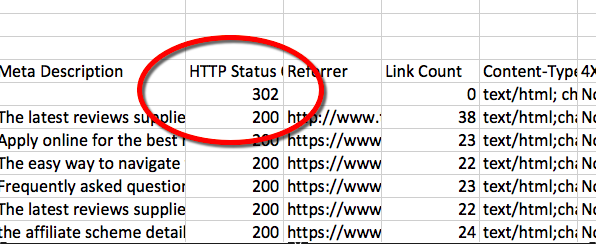
500s are server errors. They can be temporary, but best to check with your host to see what exactly is going on.

400s indicate a problem with the page. Check that page out on your backend. You might need to look at putting a 301 redirect in place if that page has changed location.

300s indicate a redirect of some sort. Learn the difference between a 302 and a 301.

"302 temporary, 301 permanent."

Drill it into your brain, chant it during your workout, pull it out at dinner parties to impress your guests. Whatever it takes. It’s fundamental, and as a web manager, marketer, online business owner, or budding SEO... you should know the difference.

If you don’t address these errors at your earliest convenience, especially on high-traffic pages, you will be disappointing me, Bonnie, and your potential customers.

So now that you’ve got the scoop, next you can dig a bit deeper with a header checker tool to locate any canonicalization errors or redirect loops. These might not looks so bad on the browser, but can be bad news for bots.

Enter all your URL combos (www, non-www, and https://) into this status checker tool: https://httpstatus.io/

Hover over the redirect to check they’re all pointing to the correct URL.

OK, right on moz.com!! 301s all pointing to the same location. Now that you know what we’re looking for, let’s see what happens when good sites go bad…

The site below starts off great, but then we see an error, and it looks like we have two versions of the URL accessible. See those 200 status codes? They generally mean we’re all gravy, that people can access that page, buuut it’s not so great in this instance. Letting bots and humans reach your site from two URLs, like www.moz.com and moz.com at the same time, is called a "canonicalization error."

Say it 5 times fast, because that’s the only fun you’ll have with a canonicalization error.

Below we see a redirect chain and a canonicalization error. This is something you might not see in a browser, but when you're dressed up like a bot it’s uncovered.

Redirect chains and canonicalization errors make it harder for search engine bots to crawl your pages. And you’ll be wasting your link juice like a sprinkler on hot tarmac.

We’re starting to find some answers to those bothersome "why" questions. These errors can be the holes in your otherwise solid ship. It’s time to go plug them up.

Further reading


#3: Gotta be FRESH from the fight

SEO can be a bit of a fight sometimes. (What am I saying? I mean ALL the time.)

Not only do you fight to keep up to date with the latest Google algorithm updates — you also battle with your competition in the SERPs.

You’re a busy website owner, you’re managing orders, or you're helping customers and running your business. You don’t have time to digest every update. I get it.

It’s understandable that you don’t want to take time away from pressing jobs at hand to read about a Penguin or a Panda update. But you also don’t want to be clueless when the winds shift — and so do your rankings. That’s where these tools come in handy.

Toolkit

Workflow

Find time to check Mozcast as regularly as you can. This will show you if things are heating up and can indicate adjustments to the algorithm.

Not sure what that all means? I would strongly recommend setting some time aside to read through the Google Algorithm history; it really helps put things into perspective.

I’m going to plug Moz Pro again, because this feature is really nifty. You can get "updates in your updates" (as beautifully Tweeted by our main man Jeremy), and see your ranking data with Google updates overlaid.

It’s important to note that correlation doesn’t necessarily mean causation. This means that a change to the way Google calculates results might affect your rankings, or it could be a coincidence. Maybe something else happened, like your competition put some work into their SEO, or maybe there's a new competitor on the scene, and so on.

You can see if an algo update aligns with fluctuations in your website rankings, and gets you started in your investigations as to why those fluctuations occurred.


#4: Gotta be SURE

In SEO (and pretty much the world) everything is relative. From my very first day on the job as a baby SEO, I’ve been asked by website makers of the world: what is a “good” number?

  • What is a good level of competition?
  • What is a good number of searches?
  • What is a good number of links?… and so on.

So here’s what you want to know: a good number is the number that’s better than your direct competitor.

Being sure is about knowing who your competitor is, and understanding what they're doing.

That’s why you’re going to do everything you’ve just done above, but for your competitor’s website.

But, before you rush off to do that, I’ll show you some more free tools to assess who your competition is.

Toolkit

Workflow

Pop your domain into SimilarWeb and click "Add Competitors." Looky what we have here! A dropdown with a list of relevant sites to get you started.

By entering the URL moz.com into SimilarWeb, we’ve found Semrush.com, Raventools.com, opensiteexplorer.org, Hubspot.com, and Searchengineland.com. That’s a great start, but there are no surprises here.

That’s why I also like to do a few manual searches in Google to find out who is else is ranking for those all-important primary keywords. Type in some of your main categories, topics, and long tail keywords to see what other sites are out there ranking for these terms.

You can also enter your domain, keyword, or a URL into SEMrush’s Competitive Data tool.

I have found this works really well for your broader primary keywords, but if you pop in a long tail term you might find there isn’t enough data.

For the term "easy site audit" above, we’re not getting any results. That’s OK — you can go back to manual searches.

But for a broader term like "site audit?" Whoa! Look at that great data!

This tool gives you quick and easy insight into your niche, helping you find related keywords to pop back into the tool or into Google so you can uncover more competitors through the organic search results tab.

But don’t stop while you’re on a roll! You can also find out even more about your potential competitor by popping their URL into Moz Content. You can run 5 content searches, 25 pages for a site, and 10 results per search on our Freemium plan.

I’ve entered "site audit" to see what articles and sites are performing well for this keyword.

Now we’ve also turned up results from some other sites, including searchenginejournal.com

So I’ll also run a search for site:searchenginejournal.com to see how their content is performing.
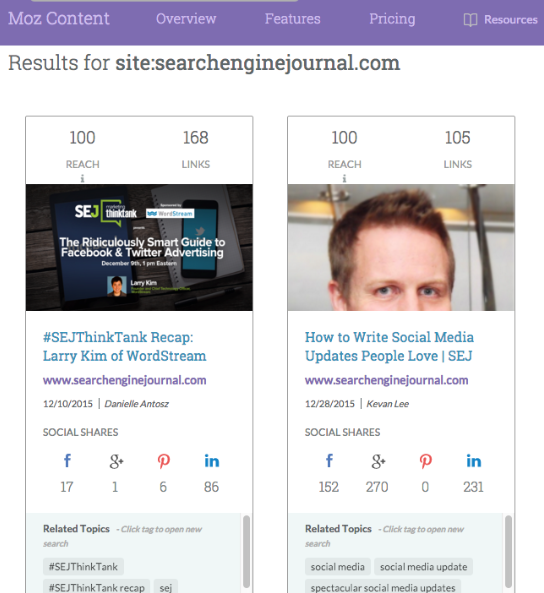
Now we can use all this valuable info to make educated decisions about what competitors to enter into your Moz Pro campaign.

Moz Pro automatically suggest 3 competitors, but with the research you’ve performed you’ll now have a good idea of who else you want to stalk — err, I mean track.

If you have more than 3 competitors you want to track, set up a second campaign for your domain and enter the other competitors. This works particularly well if you’re a small or new site and still feeling your way around within your industry.

Now you have a good idea of who you’re competing with and you’re keeping a beady eye on what they’re up to.

Further reading


#5: Gotta be SOON

"Soon" is a nicely vague timeframe, isn’t it? Soon relative to what, exactly?

In this section, we’re going to figure out your priorities.

The issues you’ve found on your site could be as vital as a server error on a crucial page (remember those nasty 500s we talked about before?), or something you’ll gradually fix, like missing alt tags on images of less-important pages.

It’s nice to think we can fix everything at once, but no matter how much bandwidth you give a project, there's only so much you can get done at any one time.

Make sure you prioritize your tasks so you don’t bite off more than you can chew.

Toolkit

Workflow

The main reason I love having a Moz Pro campaign set up for my site is the weekly Site Crawl.

It finds all the things that need attention on your site and dishes them out to you neatly prioritized by High, Medium, and Low.

High-priority issues are things you should really take care of straight away.

But by gosh, look at our Medium issues! There are 1,688 of them, so where the heck do you start?

This is where you can use some simple Excel data filtering to locate the pages with on-page issues that need attention based on Page Authority like I’ve done below. I filtered by "Title Element Too Long" and then sorted the results by Page Authority.

Now you can work through from top to bottom, crossing them off as you go. Pretty cool, right?!

If you’re a one-person-band, maybe you can look at fixing one a day, or do a couple every afternoon, or once a week — make it Bonnie Tyler Tuesday and bash those Medium issues right on the nose.

Further reading


#6: Gotta be LARGER than life

We’ve been bogged down in all these Excel sheets and data, so now it’s time to use your creativity to come up with some larger-than-life ideas.

This could be the next step beyond your current state. After all, you now know this site inside and out.

Toolkit

  • A sunny day
  • A dog’s wagging tail
  • Bonnie Tyler on full blast

Workflow

Step away from your computer, go to your creative space and think big. Draw, walk, talk to someone you know. Shake all that data out of your brain and reconstruct it into something new and beautiful.

Further reading


Did you hold out?

I hope this manifesto serves you well in your quest to make your site the best it can possibly be. If you get stuck or overwhelmed, just hum this tune and you’ll soon be back on track.

Don’t forget that Moz Pro is free for the first 30 days and you’ll be able to try out all the Mozzy features mentioned in this post to get your site ship-shape.

I’d love to know what tools, tricks, or love songs you listen to to get you revved up — let me know in the comments below!


Sign up for The Moz Top 10, a semimonthly mailer updating you on the top ten hottest pieces of SEO news, tips, and rad links uncovered by the Moz team. Think of it as your exclusive digest of stuff you don't have time to hunt down but want to read!


from Moz Blog http://ift.tt/1McLqkk
via IFTTT